Claude Code agent teams: when your agents need to talk to each other
Every agent in a team spends tokens like a separate Claude Code session. So a team only pays off when the agents have something to talk about.
I build Buzzpot, a canvas where every card holds a live agent session. When Claude Code got agent teams, a couple of people wrote to me with the same question: “So does this replace your canvas?”
I couldn’t answer right away. I hadn’t run a team myself yet, so I read Anthropic’s docs and reports from people who had put teams to work on their own projects. The conclusion turned out simple: teams fit a narrow set of tasks, and they don’t replace the canvas. Below I’ll explain why.
A Claude Code agent team is several sessions that message each other
Regular Claude Code can call in helpers, called subagents. A subagent goes off with an errand and brings the result back to the main session, so all communication runs through that session, and subagents never write to each other.
A team works differently. Here one session becomes the main one, called the lead: it sets up a shared task list and launches the other members, the teammates. Each teammate runs as a separate session and doesn’t see what the lead discussed with you. Teammates pick up tasks from the list on their own, message each other directly and argue, and you can still write to any of them without going through the lead.
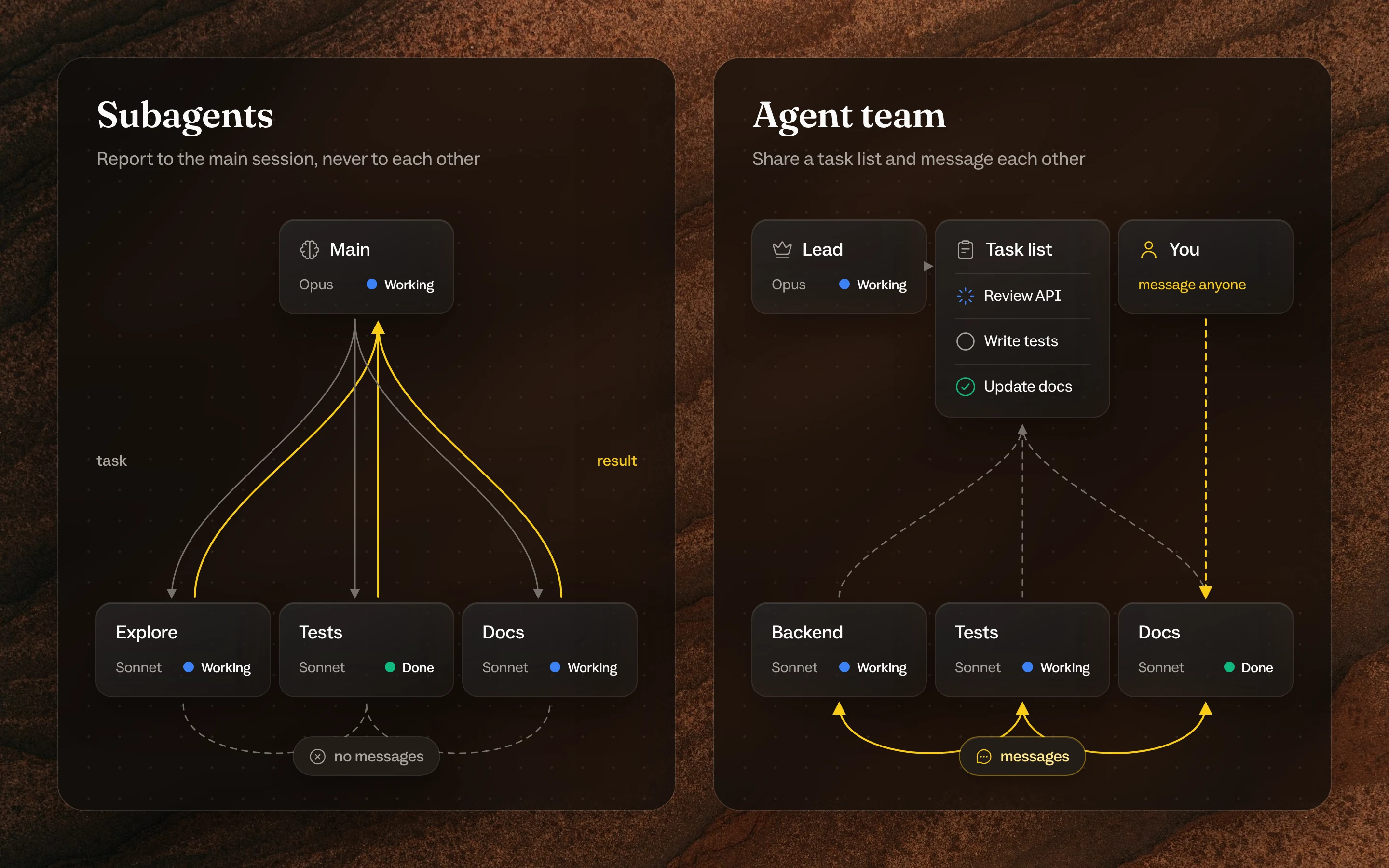
That difference sets the price. A subagent is cheaper, because it returns only the result to the main session. A teammate costs more: each one keeps its own work in memory, so spending grows with every member you add. According to Anthropic, when agents start by drafting a plan, a team uses 7 times more tokens than a regular session.
Before you launch an agent team, ask yourself: do the agents need to talk to each other?
The advice on teams that I found comes down to this question. Steve Kinney put it most precisely: a team pays off when agents need to change each other’s minds mid-task.
The question has three answers. If an agent only needs its neighbor’s result, subagents are enough. When the steps go one after another, one session will handle it. And you need a team when one agent’s finding changes another agent’s work while that agent is still at it.
Let’s test the question on five tasks from the docs and other people’s reports.
An agent team pays off on reviews, bugs with an unclear cause and new modules, but not on step-by-step work
A three-way review pays off with an agent team
A single reviewer usually latches onto one type of problem. So split the review into security, performance and tests, and give each side its own agent. Comparing findings helps here, because a security hole can also turn out to be a hole in the tests. The docs suggest starting with a task like this if you’re trying teams for the first time: the agents don’t have to write code, and you’ll see the value in the first report.
Create an agent team to review PR #<number>. Spawn three teammates: one on security, one on performance, one on test coverage. Each reviews only through its own lens. Have them share findings with each other and flag anything that touches another lens. Use Sonnet for teammates. Wait for all three, then give me one list sorted by severity.
A bug with several possible causes is the main job for an agent team
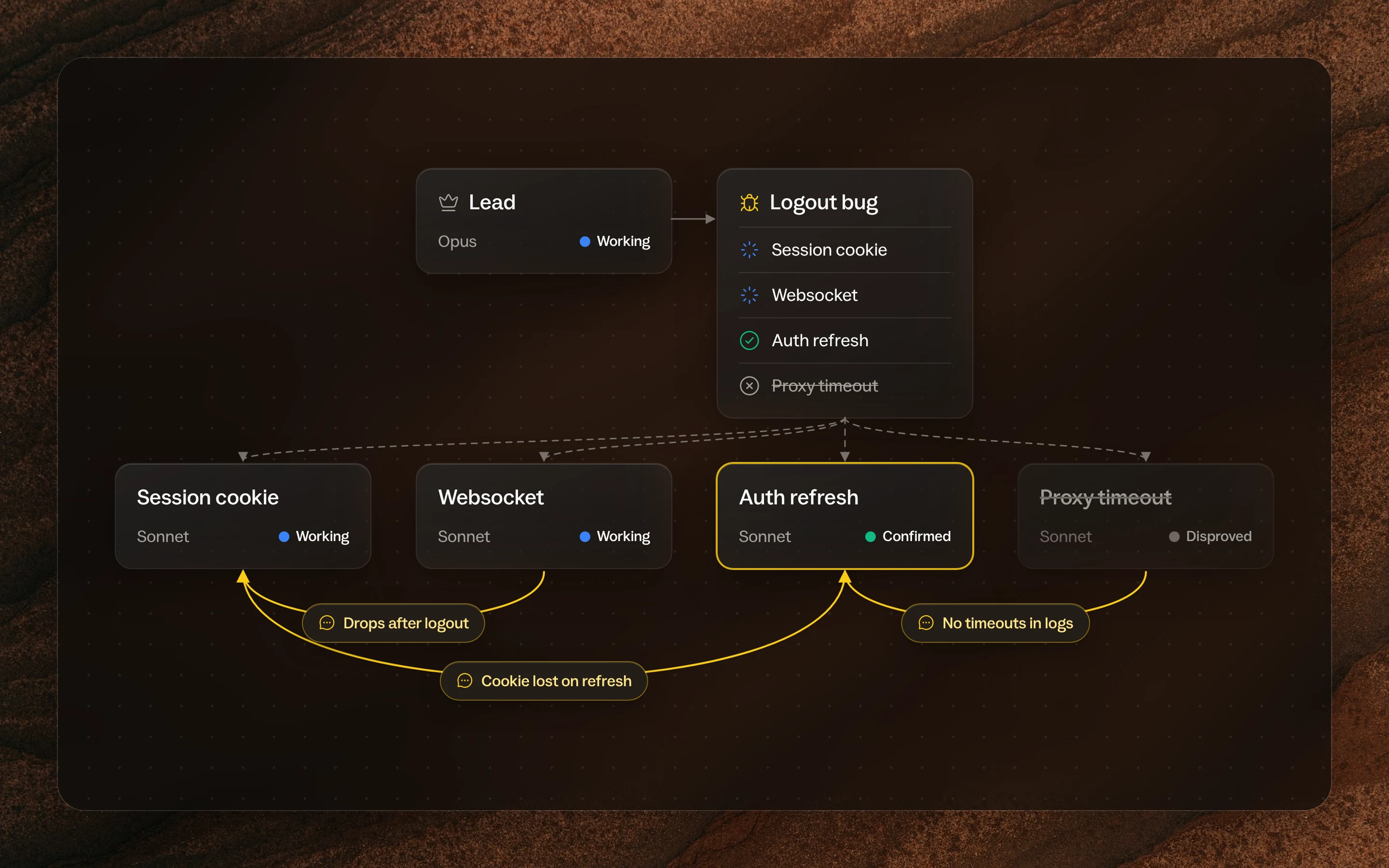
One session finds the first plausible explanation and from then on looks only for confirmation. A team breaks that habit. In a team, each teammate tests its own theory and tries to disprove the others, so the theory that survives the argument becomes the main suspect. Neither a single session nor subagents will give you that argument.
Users report <symptom>. Create an agent team of 4 teammates. Each takes a different hypothesis about the cause and tests it. Have them message each other and try to disprove each other's theories. Don't fix anything yet. When one theory survives, write it to findings.md with the evidence.
A new module pays off with an agent team if each agent owns its own files
Say you’re building a new feature and hand the UI, the server and the tests to three teammates. They have things to agree on: what data the server sends to the UI and what the fields are called. But this setup only works if each one has their own files. Two agents in one file overwrite each other. One author described publicly how he spent about $50 when four agents worked in the same code and edited the same things.
Create an agent team to build <feature>. Spawn three teammates: frontend owns <path>, backend owns <path>, tests owns <path>. Nobody edits files outside their own path. Agree on the API contract first and post it to the task list. Use Sonnet for teammates. Wait for your teammates to finish before you merge anything.
Step-by-step work doesn’t need an agent team
For example, you build a feature in steps: first the database, then the server, then the screen. Each step waits for the previous one, and the agents have nothing to talk about: the second one only needs the first one’s result. A team on a task like this will wait, message each other and burn through the limit. One session is enough here, or a chain of tasks where each one starts after the previous one.
One Claude Code session is enough for small edits and routine work
For example, you need to fix some text, update a library or rename a function. For tasks like these the docs recommend a single session. A team will spend more tokens on launching and messaging than on the edit itself, because each teammate first loads the project rules.
| Task | Do the agents need to talk? | What to choose |
|---|---|---|
| Review from several angles | Yes, to compare findings | A team of 3 teammates |
| Bug with several possible causes | Yes, to disprove each other | A team of 3–5 teammates |
| New module made of independent parts | Yes, to agree on the contract | A team, each with its own files |
| Feature built step by step | No, each step only needs the previous result | One session or a chain of tasks |
| Small edit, routine work | No | One session |
An agent team burns through the limit faster the more agents it has
Each teammate keeps its work in memory and spends tokens until it finishes. In public reports people write that spending reached $150 in three hours. In the stories I went through, the cause was one of three: a big team, a step-by-step task, or shared files.
The docs give five simple rules:
- Start with three to five teammates: in Anthropic’s experience, three agents with narrow tasks do better than five with vague ones.
- Give each one 5–6 small tasks with a clear outcome.
- Use Sonnet for teammates, not the bigger model.
- Keep a teammate’s prompt short: it loads the project rules and connected tools on its own.
- Shut a teammate down once it’s done: as long as it’s alive, it spends tokens.
Turn on agent teams with one line in settings.json
Anthropic keeps teams experimental for now and turns them off by default. To turn them on, add one line to ~/.claude/settings.json:
{
  "env": {
    "CLAUDE_CODE_EXPERIMENTAL_AGENT_TEAMS": "1"
  }
}
Then describe the task and the team you want in plain words. The lead sets up the task list and launches the teammates, and they show up in a panel below the input line. In that panel, the arrow keys select a teammate, Enter opens its conversation, x stops it, and Ctrl+T shows the task list. If you want to see everyone at once, give each teammate its own pane in tmux or iTerm2.
Before your first run, keep two things in mind. Teammates don’t see your conversation with the lead, so put everything that matters for the task into their prompt. Also, every teammate asks the lead for permissions, and the questions come one after another. Allow the commands your agents run most often ahead of time, tests for example.
When an agent team breaks, one request to the lead fixes it
Anthropic still calls teams experimental, and they break in the same few ways. The lead starts writing code itself, tasks get stuck “in progress”, and after /resume the teammates are gone. I collected these symptoms from the docs and other people’s reports into one cheat sheet. Pick your symptom and copy the line for the lead or the setting.
The lead writes code instead of waiting
The lead sometimes doesn’t wait for its teammates.
Wait for your teammates to complete their tasks before proceeding.A task is stuck “in progress”
A teammate didn’t mark the task as done, so the tasks that depend on it can’t start.
Task <name> looks done. Check with <teammate> and mark it completed so blocked tasks can start.A teammate stopped after an error
Teammates sometimes don’t recover after an error. Open the teammate with Enter and tell it what to do, or ask the lead.
Spawn a replacement teammate to continue <teammate>'s task.Two teammates edit one file
Teammates don’t own files unless you say so, and they overwrite each other.
Stop. Reassign the work so each teammate owns a separate set of files, and nobody edits outside their own.After /resume the lead writes to teammates who are gone
/resume and /rewind don’t bring teammates back.
Your teammates didn't survive the resume. Spawn new teammates for the open tasks.You asked for subagents and got a team
With the flag on, a named subagent launches as a teammate. You don’t need to restart the session.
"CLAUDE_CODE_EXPERIMENTAL_AGENT_TEAMS": "0"The lead says it’s done, but tasks remain
The lead sometimes finishes early.
Not all tasks are complete. Keep going until the task list is done.The lead is flooded with permission requests
Every teammate’s permission requests go to the lead. Allow your most frequent commands ahead of time.
"permissions": { "allow": ["Bash(npm test *)", "Bash(git status)"] }A teammate vanished from the panel
The row hides after 30 seconds of idle time. The teammate is still alive.
<teammate>, <your message>The limit keeps dropping after the work is done
Every live teammate spends tokens.
Ask <teammate> to shut down.One agent team lives in one session
Teams have a limitation that articles in search results tuck away at the end. One session gets one team. A teammate can’t build a team of its own, and the lead stays the lead until the session ends.
With one project, that limit doesn’t get in the way. But I have four products, and if each of them has work going on, that’s four sessions with four teams in four terminals. Each team handles its own task, and you hold all four projects in your head. I’ve written before about how I tried to run multiple Claude Code sessions through tabs, terminals and an orchestrator. Every time I ran into the number of projects.
Buzzpot doesn’t build agent teams, but it keeps all your projects and their agents on one screen
That’s why my answer is “no, it doesn’t replace it.” Buzzpot is a coding agent canvas: each card holds a live session, and all your projects sit on one screen. A card can’t build an agent team right now, because Buzzpot launches Claude Code from a program, and teams only form where a person types in the terminal. Subagents do work inside a card, though: the main agent hands them parts of the job and collects their answers.
The difference from the terminal is what you see from above. A card’s subagents sit right under it, each with its own status. Next to it are cards from other projects, and Codex may be working in the one next door. When an agent is waiting for your answer, the card switches to Waiting for input, and you notice it from anywhere on the canvas.
So split the work by the same question. If the agents need to argue, launch a team in the terminal. When an agent only needs someone else’s result, put several cards on the canvas and link them: the next card starts on its own once the previous one finishes. The cards don’t message each other, but step-by-step work doesn’t need that anyway.
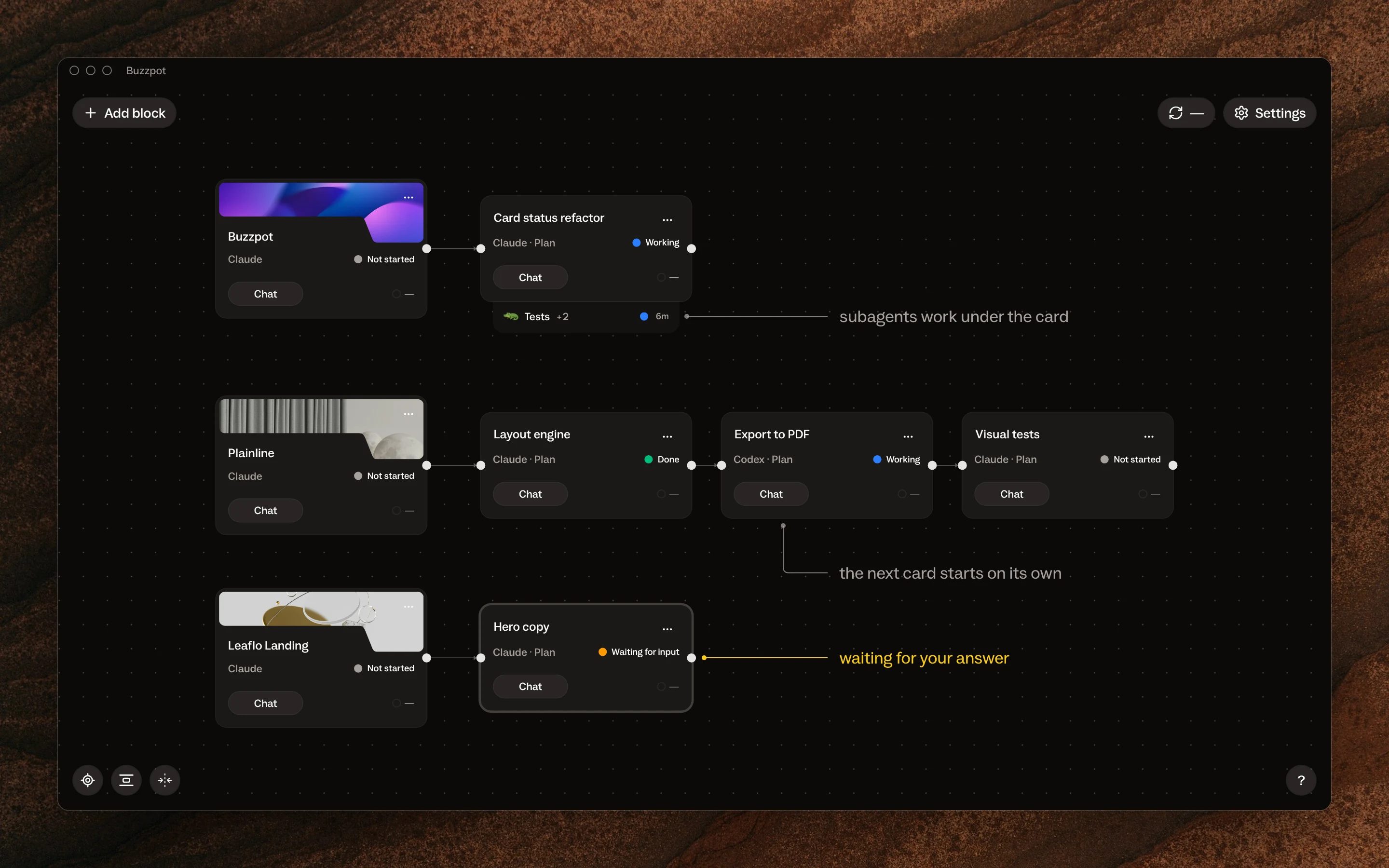
Each card works in its own copy of the project by default, so agents in different cards don’t edit the same file. The canvas follows the rule from the new-module section on its own.
Each project in Buzzpot has a coordinator. It’s a chat where you ask it to create cards and link them. The coordinator isn’t an orchestrator or a team lead: it does nothing on its own, and it creates and starts cards only when you ask. A card solves one task, and you see where that task stands among the rest. And if all you need is a Claude Code session manager, the canvas works as one too.
In short: turn on an agent team when the agents have something to argue about
- A team pays off on reviews from several angles, on bugs with several possible causes, and on modules where each agent owns its own files.
- For step-by-step tasks and routine work, one session or a chain of cards is enough.
- Start with a review: three Sonnet teammates that don’t have to write code.
- One team lives in one terminal session. If you have several projects, keep them on a canvas and watch everything from above.
Put all your projects and their agents on one Buzzpot canvas.