Claude Code GUI:
which one fits how you work.
We installed nine apps that give Claude Code a window instead of a terminal, and ran the same three tasks in each. Below, you pick the app for your kind of work. For each one we recorded a video and noted what’s handy and what isn’t.
All nine run the same Claude Code with your plan. They differ in other ways. Some show sessions as a list, others as a board or as terminals, and one app starts the next task on its own.
Tested on 13 November 2026 · 9 apps · 3 identical tasks.
Claude · Codex · Grok · macOS
Pick a Claude Code GUI by how you work.
Right now you see one app for each situation. Pick yours, and we’ll show every app that fits it; the filters narrow the list down. Hover over a card to watch the test recording.
-
Claude Desktop
The official app from Anthropic, Code tab
- Agents
- Claude only
- Systems
- macOS, Windows
- Price
- In your Claude plan
- Next task
- You start it
-
Orca
Terminals, an editor and agent changes in one window
- Agents
- 27 agents, incl. Claude Code and Codex
- Systems
- macOS, Windows, Linux, phone app
- Price
- Free, open source
- Next task
- You start it
-
Paradev
Tasks in a sidebar by status (formerly Superset)
- Agents
- 21 agents, incl. Claude Code and Codex
- Systems
- macOS; Linux experimental
- Price
- Free; Pro $20/month
- Next task
- You start it
-
Emdash
Tasks from Linear, Jira and GitHub, each on its own branch
- Agents
- 34 agents, incl. Claude Code and Codex
- Systems
- macOS, Windows, Linux
- Price
- Free, open source
- Next task
- You start it
-
Sculptor
A separate copy of the repository for every agent
- Agents
- Claude (we found no Codex)
- Systems
- macOS (Apple silicon), Linux
- Price
- Free, open source
- Next task
- You start it
-
Nimbalyst
Agent sessions on a board, documents next to them
- Agents
- Claude Code, Codex
- Systems
- macOS, Windows, Linux, iPhone
- Price
- Free, open source
- Next task
- You start it
-
Paseo
Agents run on your computer, you steer them from your phone
- Agents
- Claude Code, Codex, OpenCode, Copilot
- Systems
- macOS, Windows, Linux, iPhone, Android, web
- Price
- Free, open source
- Next task
- You start it
-
T3 Code
Switch the agent in the middle of a conversation
- Agents
- Claude Code, Codex, Grok
- Systems
- macOS, Windows, Linux, web, phone
- Price
- Free, open source
- Next task
- You start it
-
Buzzpot
All projects and tasks on one canvas
- Agents
- Claude Code, Codex, Grok
- Systems
- macOS
- Price
- Free during the beta
- Next task
- Starts itself
No app matches all the filters. Turn one of them off.
Checked on 13 November 2026. Hover or tap a card to play the recording.
A Claude Code GUI is a window over the same Claude Code.
A Claude Code GUI is an app on top of the same Claude Code you run in the terminal. The model, your plan and the CLAUDE.md file with your project rules stay the same. Only the view changes: instead of a terminal feed, you see sessions, their statuses and the edits in your files.
Roundups in search results skip one difference. Claude Desktop runs its own copy of Claude Code, while the other eight apps run the one you already have installed. So they share your settings, but the version in Claude Desktop can differ from the one in your terminal if you’ve updated only one of them.
While you have one session, the terminal is enough. You need a window once there’s more than one task and you lose track of which one runs where.
We gave nine Claude Code GUIs the same three tasks.
For the test we took two small projects: a notes server and a landing page. In the first, an agent added search and then wrote tests for it. In the second, another agent changed a button at the same time. In the first task we asked the agent in advance to ask us a question, to check whether a person would notice it in each app.
The window is the same size in every app, and the theme is dark. We cut out sign-in and onboarding. When an app could work with Codex, the landing page task went to Codex. In the recordings we sped up the agents’ pauses but kept the mistakes, because they also show what it’s like to work in the app.
Want to repeat the test? Here are the three tasks we sent, word for word.
Project 1 · Notes API
Add search to the notes API: GET /notes?q=word returns notes whose title or body contains the word, case-insensitive. Keep it small and don't add dependencies. Reply in English.after A is done
Write tests for the new search in test/notes.test.js and run npm test. Reply in English.Project 2 · Landing
On the landing page, change the button text to "Start writing" and make the button green. Reply in English.at the same time as A · on Codex, when the app supports it
Compare how each GUI shows the agent’s question.
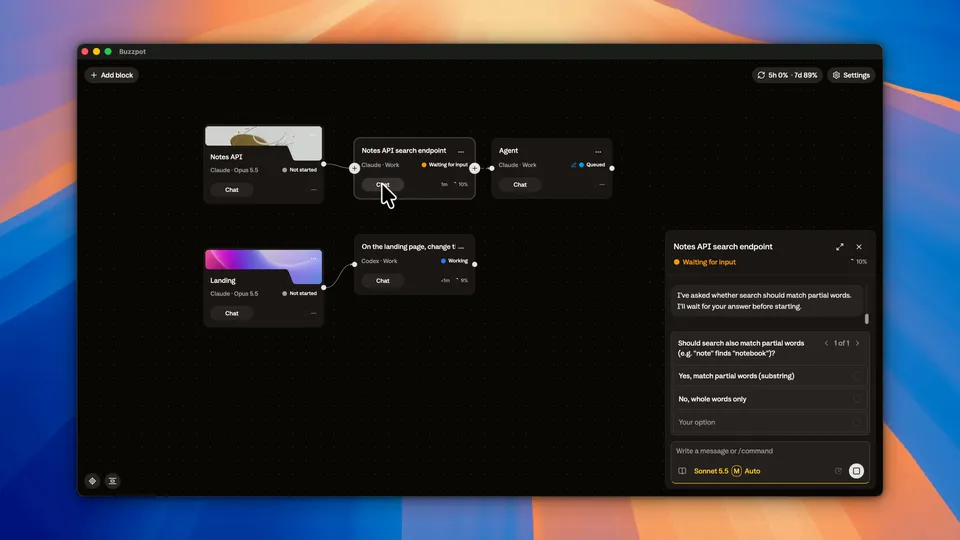
Pick a moment, and all nine recordings jump to the same step. Compare how each app shows the agent’s question, and whether you’d notice it while looking at another project.
-
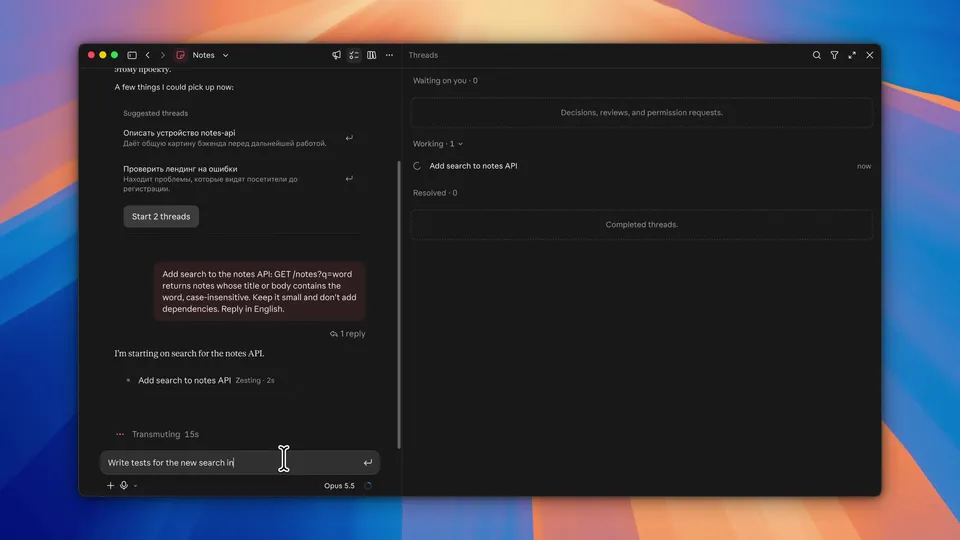
Claude Desktopno question in this run
-
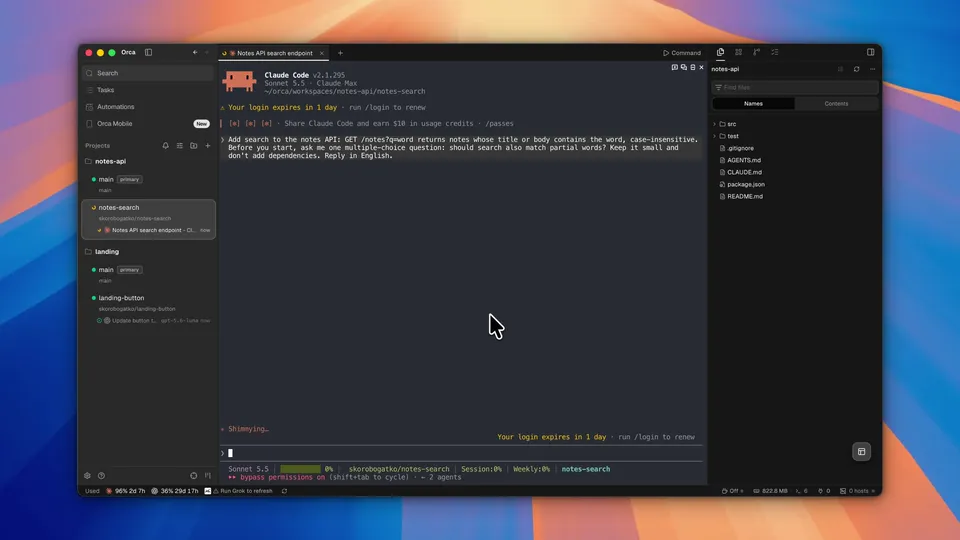
Orca
-
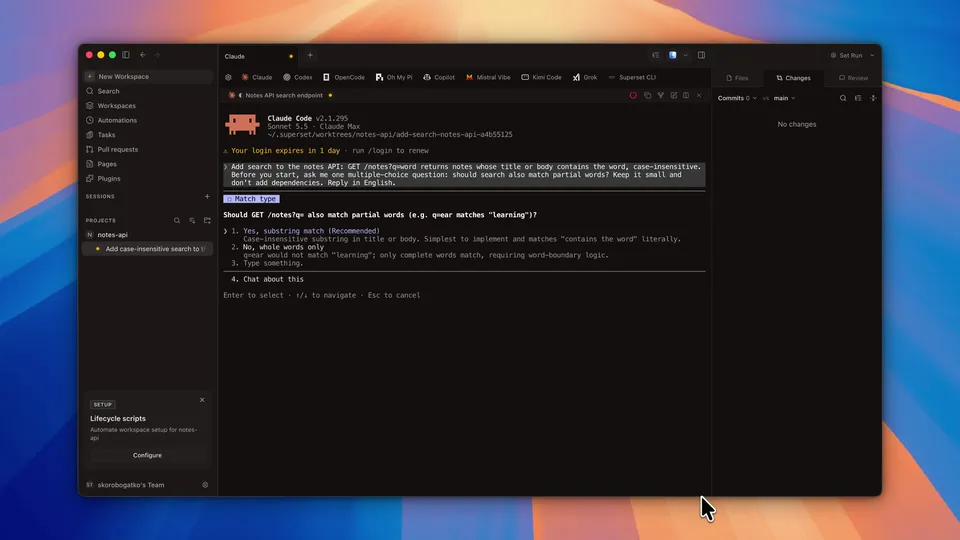
Paradev
-
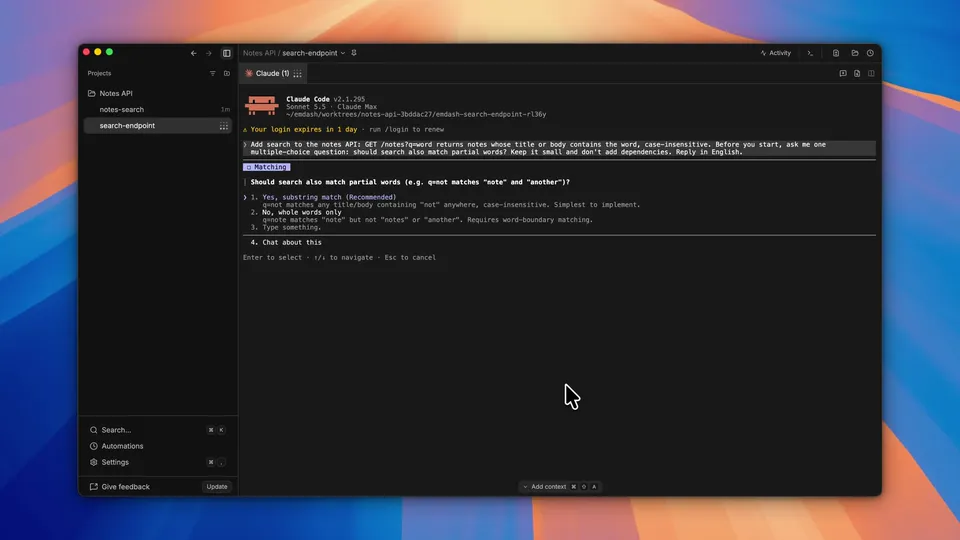
Emdash
-
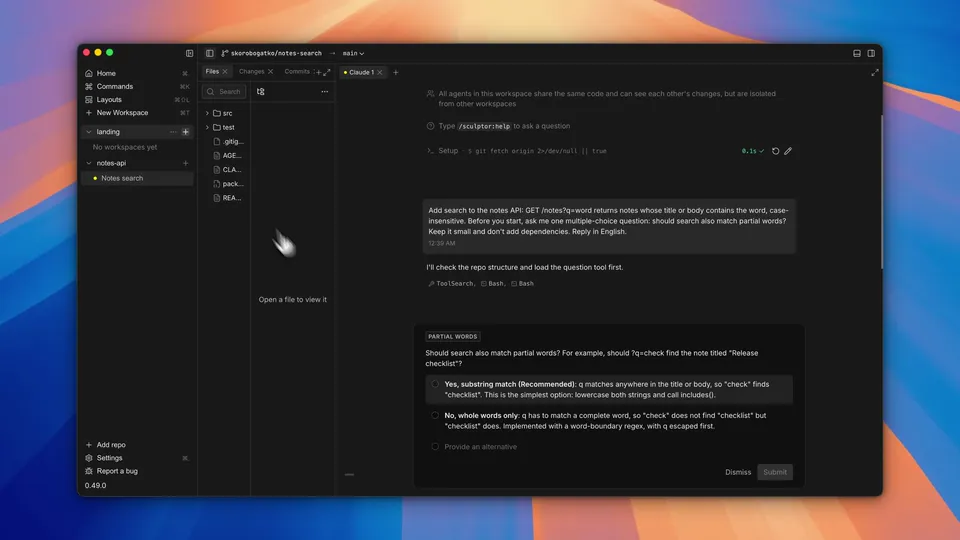
Sculptor
-
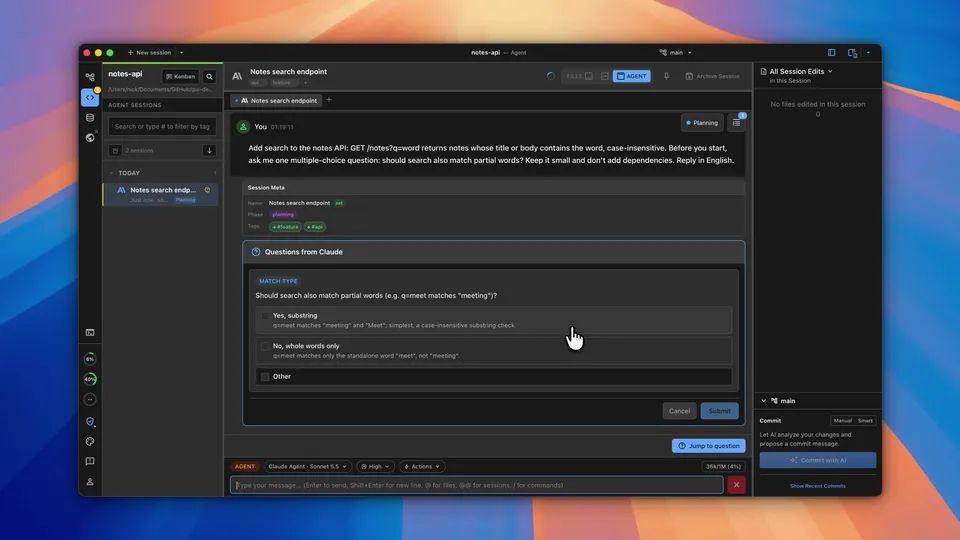
Nimbalyst
-
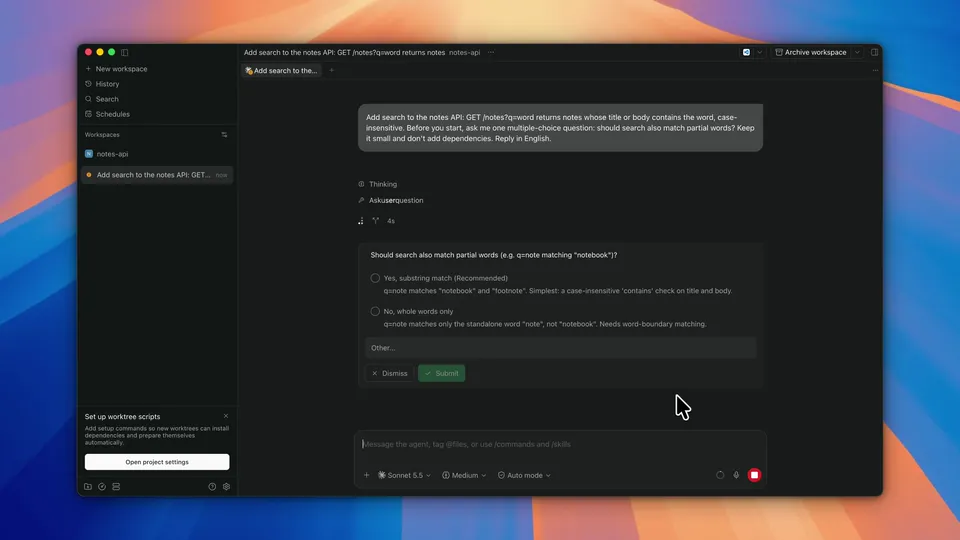
Paseo
-
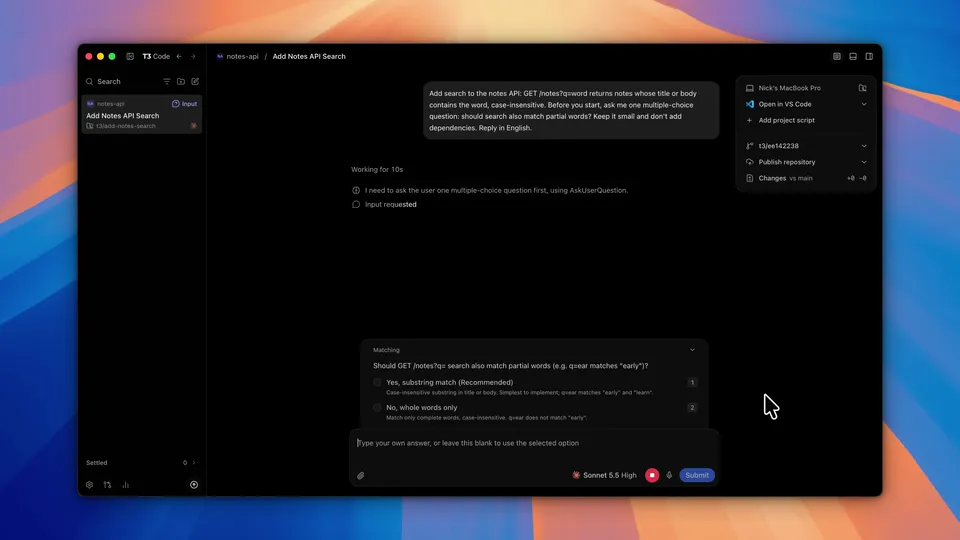
T3 Code
-
Buzzpot
Claude Desktop comes with your plan, but works only with Claude.
Say you already pay for Claude. Then start with Claude Desktop, since it comes with your plan. In the Code tab, sessions sit in a sidebar, each can have its own copy of the repository, and you comment on changes line by line and open a terminal in the same window. In projects mode, the chat splits the work into separate conversations on its own and marks the ones waiting for your answer.
But in our test the project’s conversations edited a copy of the files in the project library, not the folder on the Mac. The agent said so itself: the folder isn’t connected, and nothing changed in it. Besides, Claude Desktop works only with Claude, and you start the next task by hand.
Good fit if you work only with Claude, and most often on one task.
Orca puts terminals, an editor and agent changes in one window.
Orca is free and open source, with versions for Mac, Windows and Linux and a phone app. Each task gets its own copy of the repository, and the agent works in a regular terminal. Next to the terminal sit an editor and a changes panel, where you leave the agent comments on lines. In total, Orca supports 27 agents, Claude Code and Codex among them.
This setup suits people who are used to the terminal and want several terminals side by side. But in our test Orca started Claude without permission prompts, and we had to agree to that mode separately.
Good fit if you want the terminal, an editor and the changes in one window.
Paradev sorts tasks by status, but doesn’t run on Windows.
In Paradev, formerly Superset, each task gets its own branch and copy of the repository. Tasks sit in a sidebar under “in progress” and “ready for review”. When an agent needs your answer, the app plays a sound and puts a badge on its icon. In the changes panel you edit lines and send them to the agent, and Paradev runs Claude Code, Codex and 19 more agents.
Paradev runs on Mac. The Linux version is still experimental, and there’s none for Windows. iPhone access and remote machines come with the Pro plan for $20 a month. The code is open, but under the Elastic 2.0 license, which forbids selling it as a service.
Good fit if you work on a Mac and want to see tasks by status.
Emdash takes tasks from Linear, Jira and GitHub and gives each its own branch.
Emdash is open source, free, and runs on Mac, Windows and Linux. It finds installed agents on its own: its docs list 34, Claude Code and Codex among them. Emdash takes tasks from Linear, Jira and GitHub, gives each a branch and a copy of the repository, and shows the changes and the pull request in the same window.
In our test the first task failed. The app tried to push the branch to a remote repository that the demo project doesn’t have, and the task worked only after we turned off “Push branch to remote” in its settings. The team is now building a cloud version 2.0, and the current one gets fixes.
Good fit if your tasks live in a tracker.
Sculptor keeps every agent in a separate copy of the repository.
Sculptor is free and open source, and runs on Macs with Apple silicon and on Linux. It gives each task a workspace with a copy of the repository, and you can add more than one agent to a workspace. There you also get a terminal, a list of changes and a pull request button.
In our test we didn’t find Codex in the interface: the list had only Claude models. The authors themselves call Sculptor an experiment.
Good fit if you work only with Claude and want a separate copy of the repository for each task.
Nimbalyst puts agent sessions on a board and documents next to them.
Nimbalyst is free and open source, with versions for Mac, Windows, Linux and iPhone. It lays out agent sessions on a board, in stages from plan to finished task. Next to the board sit editors for text, tables and diagrams, so the task description and the code live in one window. Nimbalyst works with Claude Code and Codex, and you accept or reject every edit the agent makes.
Each project opens in a separate window, though. Nimbalyst showed the agent’s question as a separate block with options, and we answered it in one click.
Good fit if you plan tasks on a board and write descriptions next to the code.
Paseo runs agents on your computer, and you steer them from your phone.
Paseo is free and open source. The agent runs on your computer or server, and you steer it from the app for Mac, Windows, Linux, iPhone, Android or from a browser. Paseo encrypts the connection between them. It runs Claude Code, Codex, OpenCode and Copilot, and creates a copy of the repository for a task if you choose to.
In our test we created the copy of the repository with one switch. The agent’s question came as a block with options right in the chat.
Good fit if you often step away from your computer.
In T3 Code you switch the agent in the middle of a conversation.
T3 Code is free and open source, and runs on Mac, Windows, Linux, in a browser and on a phone. Each conversation with an agent gets its own copy of the repository, and you can switch the agent mid-conversation. T3 Code connects Claude Code, Codex and Grok, shows the changes after each agent reply, and creates a pull request, and not only on GitHub.
But by default T3 Code starts new conversations with full access, without confirmations. In our test it also warned that it doesn’t support our version of Codex, even though Codex finished the task. The authors say plainly that the product is at an early stage.
Good fit if you switch between agents within one task.
Buzzpot shows all projects and tasks on one screen.
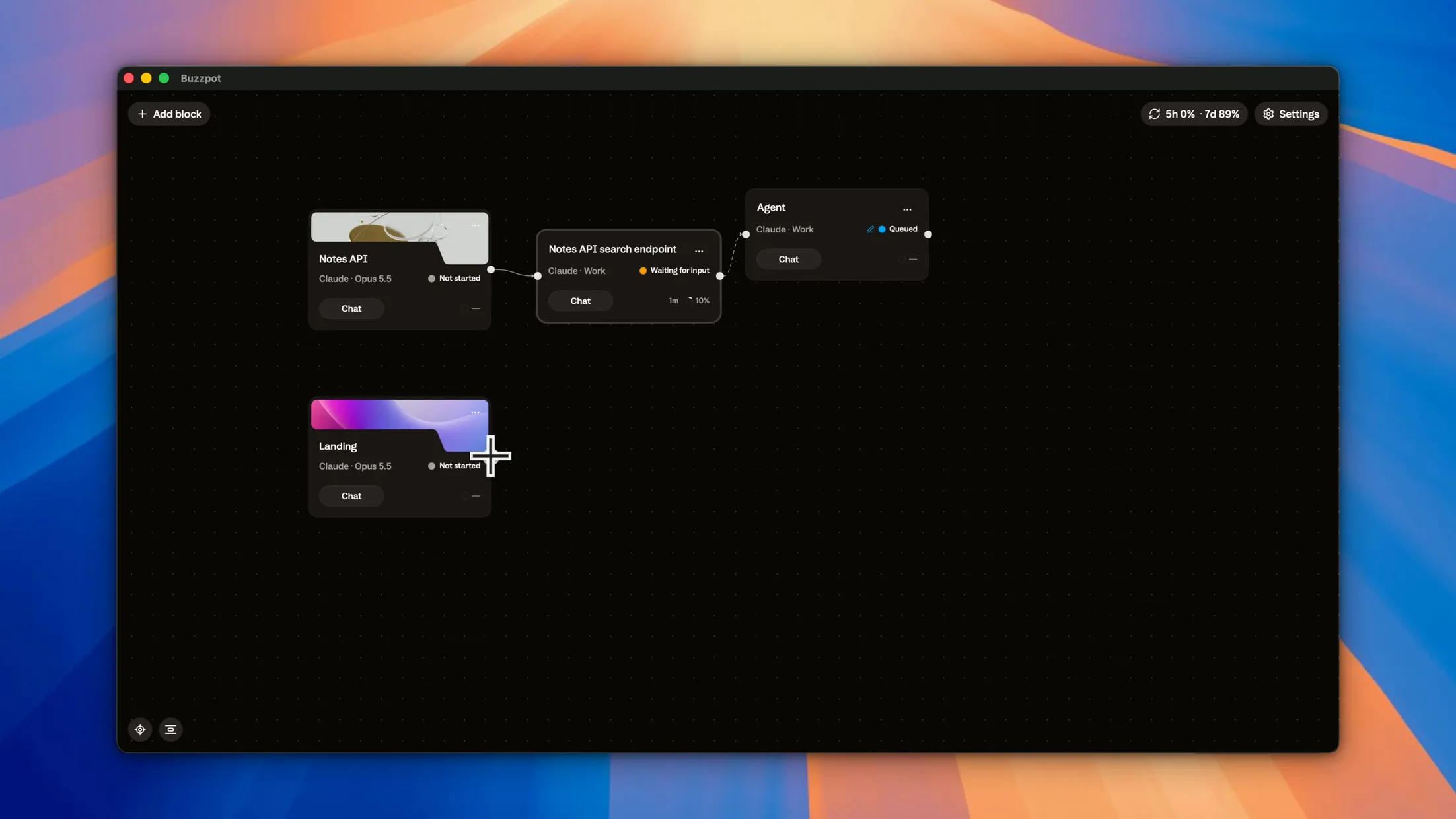
In Buzzpot each task is a card on a shared canvas, and the projects sit next to them. A card shows whether the agent is working, waiting for you or done. Buzzpot runs Claude Code, Codex and Grok through your own installed tools, gives each task its own copy of the repository and merges it back when the task is done.
In our test, only in Buzzpot did the tests task wait in a queue and start on its own as soon as the agent finished search. Buzzpot has no terminal and no changes panel, so for those you still open the terminal and an editor. It runs only on Mac. During the beta Buzzpot is free.
Good fit if you have several projects and tasks that run one after another.
Nine Claude Code GUIs in one table.
We collected the facts from websites and documentation on 13 November 2026. Where we couldn’t confirm a fact, the cell has a dash.
| Claude Desktop | Orca | Paradev | Emdash | Sculptor | Nimbalyst | Paseo | T3 Code | Buzzpot | |
|---|---|---|---|---|---|---|---|---|---|
| Agents | Claude only | 27, incl. Claude Code and Codex | 21, incl. Claude Code and Codex | 34, incl. Claude Code and Codex | Claude | Claude Code, Codex | Claude Code, Codex, OpenCode, Copilot | Claude Code, Codex, Grok | Claude Code, Codex, Grok |
| Systems | macOS, Windows | macOS, Windows, Linux | macOS; Linux experimental | macOS, Windows, Linux | macOS (Apple silicon), Linux | macOS, Windows, Linux, iPhone | macOS, Windows, Linux, iPhone, Android, web | macOS, Windows, Linux, web, phone | macOS |
| Price and license | In your Claude plan | Free, open source | Free; Pro $20/month; Elastic 2.0 | Free, open source | Free, open source | Free, open source | Free, open source | Free, open source | Free during the beta |
| How you see the work | Sessions in a sidebar | Terminals | Sidebar by status | Tasks with branches | Workspaces | Board | Chats | Conversations | Canvas of cards |
| How it shows the agent’s question | Marks conversations that wait for you | — | Sound and a badge on the icon | — | — | Block with options | Block with options in the chat | — | Status on the card and a notification |
| Separate copy of the repository | Yes | Yes | Yes | Yes | Yes | — | Optional | Yes | Yes, merged back when done |
| Review changes | Yes, line comments | Yes, line comments | Yes | Yes | Yes | Accept or reject each edit | — | Yes | No |
| Terminal | Yes | Yes | Yes | — | Yes | — | — | — | No |
| Phone | Yes | Yes | Pro plan | — | — | iPhone | Yes | Yes | Yes, Remote control |
| Next task starts itself | No | No | No | No | No | No | No | No | Yes |
Only in Buzzpot does the next task start itself when the previous one ends.
GUIs for Claude Code appeared so you could see more than one session at once, and all nine handle that. Next, you need something else: a task that, once done, starts the next one itself. First the agent adds search, then it writes tests, then it reviews the code. Orca, Paradev, Emdash and Paseo have schedules and automations for this, but they start a task on a timer, not when the previous one ends.
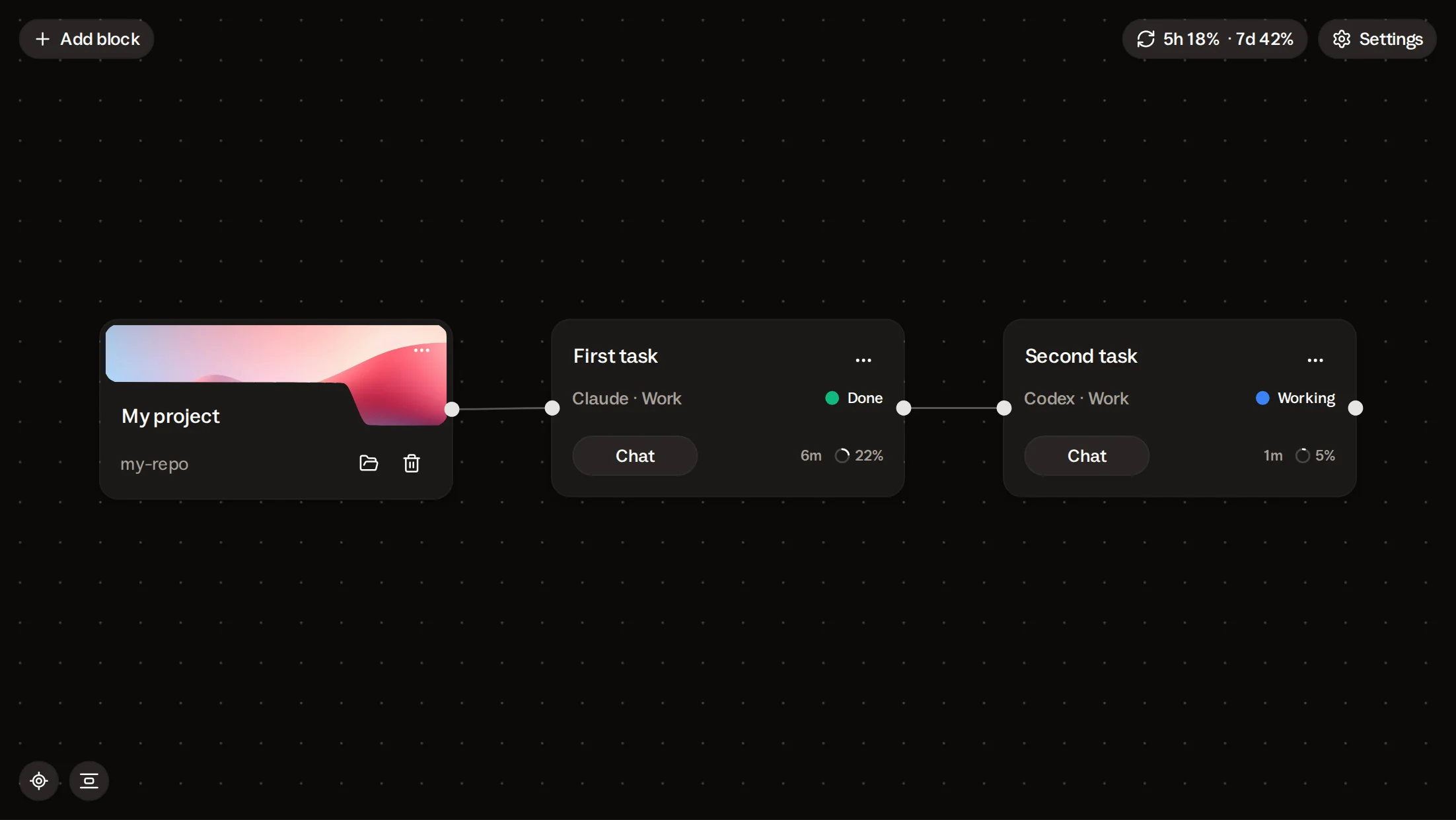
In Buzzpot, such a link is an arrow between cards. We showed how a chain of these cards takes a task from plan to review on the page about the coding agent canvas.
Download Buzzpot and let the next task start on its own.
Buzzpot is free during the beta. You need a Mac and Claude Code, Codex or Grok installed. A first try takes a few minutes:
- Add a project card.
- Add two tasks and link them with an arrow.
- Send the first task and watch the second start on its own.
Claude · Codex · Grok · macOS
Does Claude Code have an official UI?
Yes, the Code tab in Claude Desktop. It comes with your Claude plan.
Do I need a separate subscription for a third-party GUI?
No. All nine apps work with your Claude plan or an API key. Of the nine, only Paradev has a separate plan for remote access: Pro costs $20 a month.
Which GUI should I pick for Windows?
Orca, Emdash, Nimbalyst, Paseo, T3 Code or the official Claude Desktop. Buzzpot, Paradev and Sculptor don’t run on Windows.
Is it safe to give a GUI full access?
T3 Code starts agents without confirmations by default, and Orca did the same in our test. Check the mode before your first task and work in a separate copy of the repository.
How is Buzzpot different from the rest?
Projects and tasks in Buzzpot sit on one screen, and the next task starts itself when the previous one ends. More on the coding agent canvas.